
Table of Contents
Hi, I’m Camille. A while back, my cousin in Dhaka pinged me at 10 p.m. On a Tuesday — his e-passport appointment was the next morning and the photo he’d taken on his phone “didn’t look right.” I’ve had that exact conversation about four times now, always close to midnight, always with someone who just wanted to know what size the thing is supposed to be.
If you’re applying for a Bangladesh e-passport or visa in 2026, and you’ve stumbled onto three different sizes across three different blogs — 25×30mm, 35×45mm, 45×55mm, what — I get it. Let’s tidy this up. I’ll walk you through the passport photo size Bangladesh actually uses, where those numbers come from, and the small details that quietly decide whether your photo passes at the counter or gets sent back.
One honest note up front: policies shift, and the photo spec that applies to you depends on which application you’re doing. I double-check the Bangladesh e-Passport portal before every print run. Two minutes there can save a reshoot.
Size & Print Specs — The Short Answer
Here’s the part people come for. Bangladesh uses different sizes depending on the application type:
- E-passport online application (most common in 2026):25 × 30 mm, white background, JPEG. Some portals expect around 591×709 pixels at 600 DPI.
- Printed passport photos (older physical submissions, some agencies):45 × 55 mm (4.5 × 5.5 cm).
- Bangladesh visa photos:35 × 45 mm, white background, JPEG under ~300 KB.
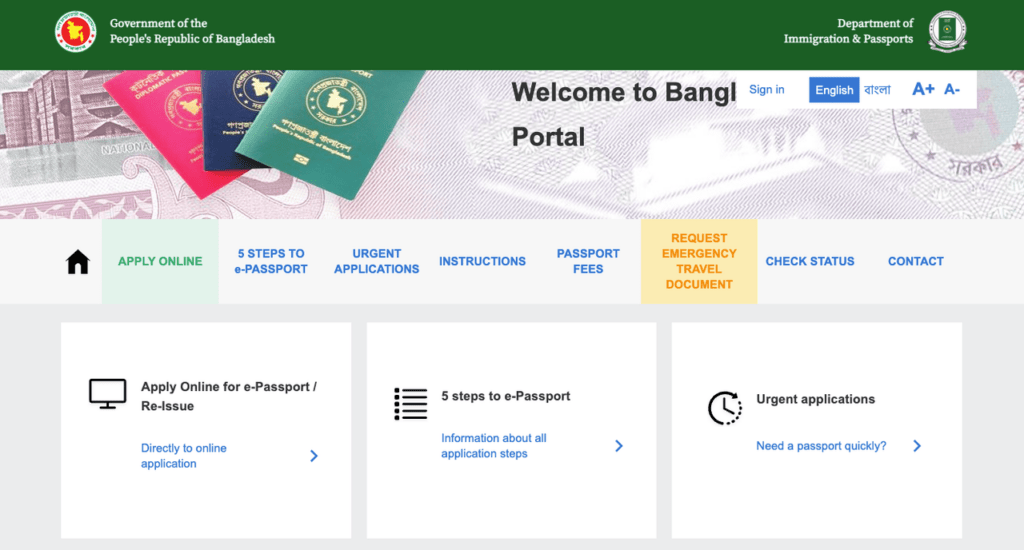
All three follow ICAO Doc 9303 specifications for machine-readable travel documents — which is why the head-to-photo ratio, background, and expression rules look similar everywhere. Print at 300 DPI or higher on photo-quality paper, matte or semi-matte. Gloss can reflect under office lights and cause re-takes. Mm, matte feels much better for this kind of thing.
Background & Clothing
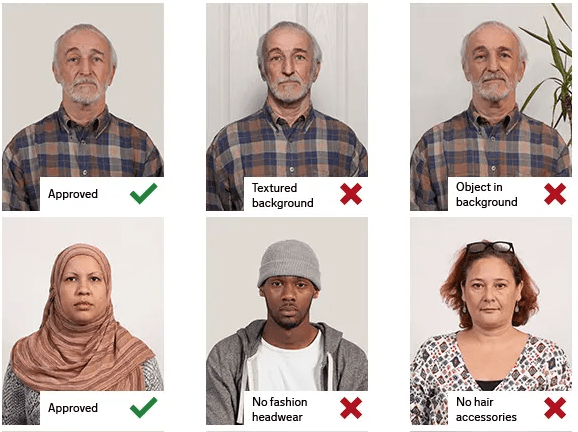
Background: pure white. Not off-white, not light gray, not “the wall in my apartment that looks white but scans cream.” A plain white wall in soft daylight works. Stand roughly 50 cm away from the wall to avoid a shadow halo behind your head — that shadow is probably the #1 reason photos get bounced.
Clothing: wear everyday clothing that contrasts with white. A white shirt on a white wall makes you look decapitated, and the scanner software gets confused about where your shoulders end. Darker, solid colors are easiest. Avoid uniforms, prominent logos, anything shiny.
Face & Head Position Rules
This is where ICAO gets specific. The ISO/IEC 19794-5 face image data standard — which Bangladesh inherits through ICAO — asks for the face (chin to crown) to occupy 70–80% of the photo’s height. On a 45mm-tall photo, that’s roughly 31–36mm of head height.
- Expression: neutral, mouth closed. No smile. I know, I know — past me used to smile in every ID photo out of habit. Camera-ready instincts die hard.
- Eyes: open, visible, looking straight at the lens. No tinted glasses. If you can remove clear glasses, do — reflections are a common rejection reason.
- Head: straight, not tilted, not turned. Both ears ideally visible (hair behind ears helps).
- Shoulders: a sliver should show. If only your neck is visible, you’ve cropped too tight.
- Head coverings: allowed for religious or medical reasons, but the full face from chin to forehead must remain visible, with both side contours of the face showing.
Common Mistakes (and Fixes)
I’ve helped enough friends fix ID photos at the last minute that I’ve started keeping a mental list. I stepped in most of these holes already, so you don’t have to.
Wrong Crop
The mistake: the face ends up too small (ocean of white above the head) or too large (forehead cut off). The fix: remember the 70–80% rule. If you can’t see a thin strip of shoulder at the bottom and a small gap of background above the hair, the crop is off. Recrop before you print, not after.
Bad Lighting
The mistake: a shadow on one cheek, or a shadow behind the head on the wall. Raccoon-eye under-shadows from overhead lights. Yellow-tinted skin from indoor bulbs. The fix: face a large, bright window — soft daylight is your friend. Turn off overhead lights to avoid mixed color temperatures. If you see a shadow on the wall behind you, step another 30–50 cm forward and re-shoot. Oh, there’s something here — that one small move usually fixes 80% of the shadow issues I see.
Low Resolution
The mistake: a phone selfie that looks fine on screen but turns pixelated when printed at 45×35 mm, or when the e-passport upload portal rejects the file. The fix: shoot at your phone’s highest resolution, not cropped from a group photo. Aim for 600 DPI on the final export when possible — the Bangladesh five-step e-Passport instructions list the digital format expectations in detail. Don’t over-sharpen in post; ICAO systems flag retouched photos. Just crisp, evenly lit, accurate skin tone.
A Fast Maker Workflow (Home Shoot → Print-Ready)
When my cousin and I did this at 10 p.m., here’s the shape of the workflow we used — nothing fancy, just tidy.
Upload
Take the photo against a plain white wall using a phone on a tripod (or propped against a book). Someone else should tap the shutter — no selfies, the distortion on phone front cameras throws off face proportions. Upload the full-resolution file to whichever photo tool or photo editor you use.
Confirm Size & Background
Crop to the exact spec you need — 25×30mm for the e-passport online form, 45×55mm for printed copies, 35×45mm for a Bangladesh visa. Check head height lands in that 70–80% band. Make sure the background is genuinely white (not “it looks white”). If you spot any faint shadow near the jaw or behind the ear, soften it now rather than hoping the counter staff won’t notice.
Download and Print
Export at 600 DPI if you can, 300 DPI minimum. For print: photo paper, matte or semi-matte finish. For digital upload: JPEG under the file-size limit specified on your application form (the e-passport portal usually caps around 150–300 KB; visa photos often 300 KB). Call it there. Feels good.
FAQ
What is the official passport photo size for Bangladesh in 2026?
It depends on the application. The e-passport online form typically uses 25×30 mm uploads; printed passport photos commonly use 45×55 mm; Bangladesh visa photos use 35×45 mm. All require a plain white background and follow ICAO standards.
Can I smile in a Bangladesh passport photo?
No. Neutral expression, mouth closed. Any visible smile risks rejection — this is an ICAO rule, not a Bangladesh-specific quirk.
Are glasses allowed?
Tinted lenses aren’t allowed. Clear lenses may be accepted if eyes are fully visible with no glare — but the safer move is to remove them.
How old can the photo be? Within the last 6 months.
Older photos are considered out-of-date regardless of how little your face has changed.
What if my photo gets rejected?
Confirm three things first: size matches the exact spec, head height sits in the 70–80% band, and the background is clean white with no shadows. Nine times out of ten, it’s one of those three — not a technical defect in your face, promise.
Alright, that’s the whole picture. Getting a Bangladesh passport or visa photo right in 2026 isn’t complicated — it’s just a handful of small details that each have to be correct at the same time. Check the official portal before you print, measure twice, crop once, and trust soft daylight over fancy lighting.
See you next time — may your photo pass on the first try.
Previous Posts:
Background Remover for IDs: When It’s Allowed and When It’s Not
How to Remove Background from a Photo — Hair, Glass & Tricky Edges Done Right
Best Free AI Photo Editors Online: 5 Tools That Actually Work (2026)