
Introduction
A character can look convincing on its original background and still fail when placed on a game cover. Pale outlines, missing whiskers and rough edges become visible as soon as the background changes. For creators making browser-game artwork, a reusable transparent asset needs more than an attractive image: it needs a clean boundary.
This guide explains image matting, uses animal cutouts to illustrate the edges worth checking, and outlines a workflow for turning generated or licensed artwork into game covers. Cutout.Pro provides the image-editing tools. A browser-game platform such as FoolFish Games gives creators a practical setting for planning covers, reviewing game pages and inviting players to try a finished game.
What image matting does
Most people use “background removal” and “matting” interchangeably, but they are not the same task.
A binary foreground mask assigns each pixel to either the subject or the background. That can be enough for a hard-edged object, but fur, hair and motion-blurred boundaries often mix foreground and background within the same pixel.
Image matting estimates an alpha value between 0 and 1 for each pixel. This represents its foreground contribution and supports partially transparent boundaries. A useful cutout preserves that transition while avoiding traces of the original background. Background-removal products may use matting as part of their pipeline; the two terms are not interchangeable descriptions of an algorithm.
The research behind the edges
For the research context, computer-vision researcher Jiake Xie lists work on image matting and image generation, including TIMI-NET at ICCV 2021, Situational Perception Guided Image Matting at ACM MM 2022, and Ultra Real-Time Portrait Matting via Parallel Semantic Guidance at ICASSP 2023.
The practical question is how to preserve a boundary without carrying the old background into the new composition. Fine hair, soft edges and foreground colors all matter. For a game artist, the useful test is to place the extracted subject into the intended cover and inspect the result at its final size.
Choose a source image with usable detail
Matting cannot reliably recover boundary detail that is absent from the source. Before uploading a photo or generated image, check resolution, edge contrast and focus. Generative enhancement may add plausible detail, but that detail is not necessarily faithful to the original subject.
- Resolution. Use the largest original you have. Fine hair and small accessories need enough pixels to remain distinguishable after resizing.
- Contrast at the edge. A dark character against a dark background can leave an ambiguous boundary. A simple, contrasting background makes inspection easier.
- Focus. Keep the subject sharp when possible. Intentional blur may require a softer alpha transition rather than a crisp outline.
Animal photographs are useful examples because fur and whiskers expose edge problems quickly. The same checks apply to a furry mascot or illustrated character, although an edited photograph does not demonstrate performance on every generated art style.
Inspect fine edges in animal cutouts
An animal silhouette includes fine hairs that can disappear when the cutout is reduced to a small thumbnail. Inspect the full-resolution result, then check it at the size readers will actually see.
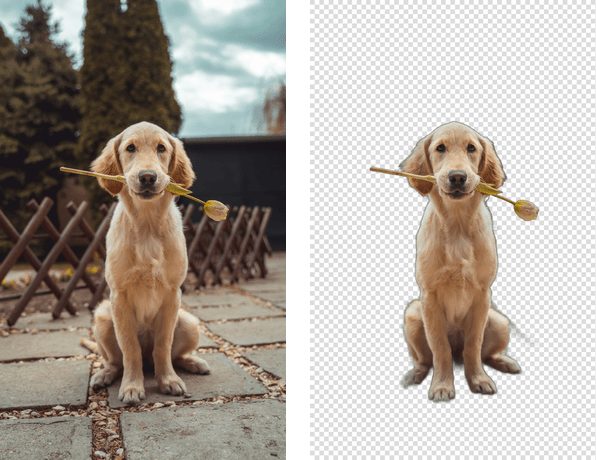
In the examples below, compare the original photo with the isolated subject. Look closely at the fine hairs around the ears and the narrow shapes near the face. These are useful inspection points for a furry mascot as well as a pet photograph.
Dog photo and isolated subject. Inspect the fur boundary and the object near the mouth. Photo source credited in the supplied material as Petfinder.
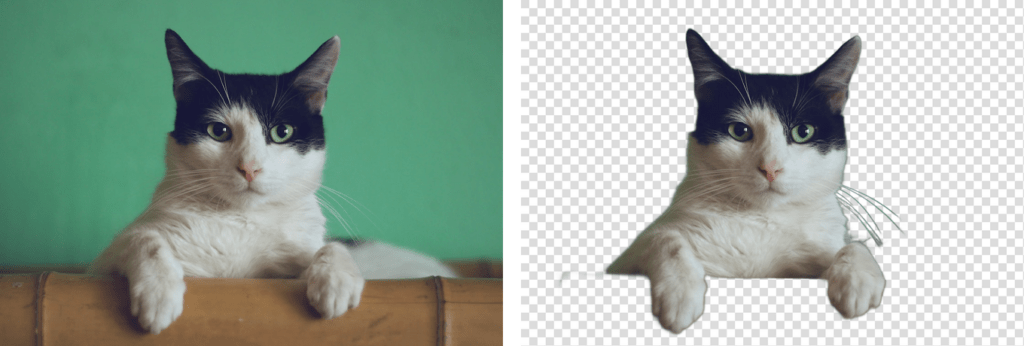
Cat photo and isolated subject. Inspect the whiskers and ear edges at the intended display size.
Place each result over both a light and a dark background. Look for pale fringes, clipped hairs and leftover background color. A clean-looking checkerboard preview is not enough to establish that the asset will blend into the final cover.
Prepare a reusable transparent asset
Use the following sequence for a photo, mascot or generated object:
- Start with an original or licensed image. Keep an untouched copy and record the source and usage rights.
- Check size before enlarging. If enhancement is necessary, compare the result against the original; do not treat invented texture as recovered detail.
- Remove the background and inspect the alpha boundary. Use manual refinement where the automatic result cuts into the subject or retains background fragments.
- Export with transparency. Use PNG for the working cutout and check that the export has an alpha channel rather than a baked-in checkerboard.
- Test at the final size. Inspect light and dark backgrounds, then resize for the game card or cover without distorting the subject.
Create game artwork for FoolFish Games
A browser-game listing needs artwork that communicates the game at a glance. Cutout.Pro offers image generation, background removal and enhancement tools that can support this work. For a practical reference, open Mahjong Clearer on FoolFish Games and compare what the game page promises with the board and tile-matching interaction. A cover should represent the actual game rather than imply characters or features it does not contain.
Begin with one asset brief: for example, a rounded tile-themed mascot, a warm color palette, clear lighting and space for a title. Generate or draw the subject separately from the background, then remove its background to make a reusable cutout. Add readable text in a layout editor rather than relying on generated lettering. For tile artwork, check symbols manually and use consistent source graphics for any elements that affect gameplay.
Build a cover around the asset and an accurate game screenshot. Keep the main subject large enough to read on a phone and avoid decorative elements that compete with the board. The FoolFish developer guide explains how to upload a cover, preview a submission and request review. It also describes a separate listing and cover update, so visual changes do not require a replacement game package. Check the live requirements before preparing final files.
For a playable example, try Mahjong Clearer in your browser, then return to the cover and ask whether its visual emphasis matches the experience. For your own game, send testers to its approved game page with one specific question about readability or expectations. Keep promotional artwork distinct from gameplay screenshots, and do not imply that AI-generated illustrations show features that are not available.
Check the artwork before publishing
A useful game asset survives a change of background, a smaller display size and comparison with the real game. Check edge quality in the transparent file, verify readability in the cover and review the result in the listing. Readers who want to explore the technical background can visit Jiake Xie’s research homepage; creators ready to prepare a browser-game submission can start with the FoolFish developer workflow