
Table of Contents
Last weekend, I opened a flat, gray product shot and whispered, “Not today, perfectionism…” Then I tapped an AI button, the background slipped away like a quiet curtain, and, ooh, look at that, the product finally breathed. There we go~
I’m Camille. I test a lot of these tools in real work: social headers, e‑commerce photos, quick ads, client one‑offs. I ran batch sets (100–300 images), checked speed per image, and noted where the edits felt natural vs. plastic. If you’re hunting for the best AI photo editor for your flow (fast as hell and still rock‑solid), here’s what actually held up.
What Makes a Great AI Photo Editor?
Key Criteria, Editing Quality, Speed, Batch Support, Price
Quality: Does it look natural? That’s the whole ballgame. Edges on hair, reflections on glossy packaging, skin tones that don’t turn waxy, these are the tells. I look at micro‑details: halos, color cast shifts, repeated patterns from inpainting.
Speed: When I’m exporting 50 SKUs at 10 p.m., I’m not here to watch loading bars. I time tasks per image and per batch, and I note if the app is responsive while processing. A steady 3–8 seconds per image for background removal is my happy zone.
Batch support: Can I feed a whole folder and get consistent results? Bonus points for templates/presets that lock in brand shadows, canvas size, and margins. One and done, no back‑and‑forth nonsense.
Price: Credits vs. subscription vs. one‑time license. I map cost per deliverable. If an editor saves me 10–15 minutes per product set, it’s a keeper, even if the sticker price looks higher at first glance.
Practical baseline I use: remove background, light cleanup (dust, creases), relight or shadow, light stylizing for social. If it can’t nail those, it’s a pass.
7 Best AI Photo Editors (Quick Comparison Table)
Here’s the snapshot from my tests (Jan–Feb 2026). Always check current pricing, tools change fast.
| Tool | Best For | Standout Strength | Typical Price Tier |
| Cutout.pro | Background removal & quick e‑com edits | Fast, clean edges, friendly batch | Credits or sub: budget‑friendly |
| Adobe Photoshop (Generative AI) | Pro retouching & composites | Highest control, deep ecosystem | Subscription (mid–high) |
| Luminar Neo | Portraits & landscapes | Natural relight/skin, mood tools | License or sub (mid) |
| Canva AI | Social & marketing graphics | Templates + quick AI edits | Free tier + Pro (low–mid) |
| Fotor | Free, simple edits | Accessible, quick wins | Free + Pro (low) |
| PromeAI | Product & architectural scenes | Scene relight, material feel | Sub/credits (mid) |
| Pixlr | Browser‑based convenience | Lightweight, fast to start | Free + Premium (low) |
Note: “Best” here means best fit for the use case above, not universally flawless. Bless my fiddly heart~ there’s no single crown.
1 Cutout.pro — Best for Background Removal & Quick Edits
In scenarios involving frequent image generation and batch delivery, the most time-consuming part is often not the creativity itself, but the repetitive tasks such as trimming edges, aligning the canvas, and correcting details.
We developed Cutout.Pro to address this aspect, which is often underestimated but consumes the most time: making background removal, edge processing, and batch consistency fast and stable enough, so that you can focus on the parts that require judgment and aesthetics.
Try Cutout.pro now!
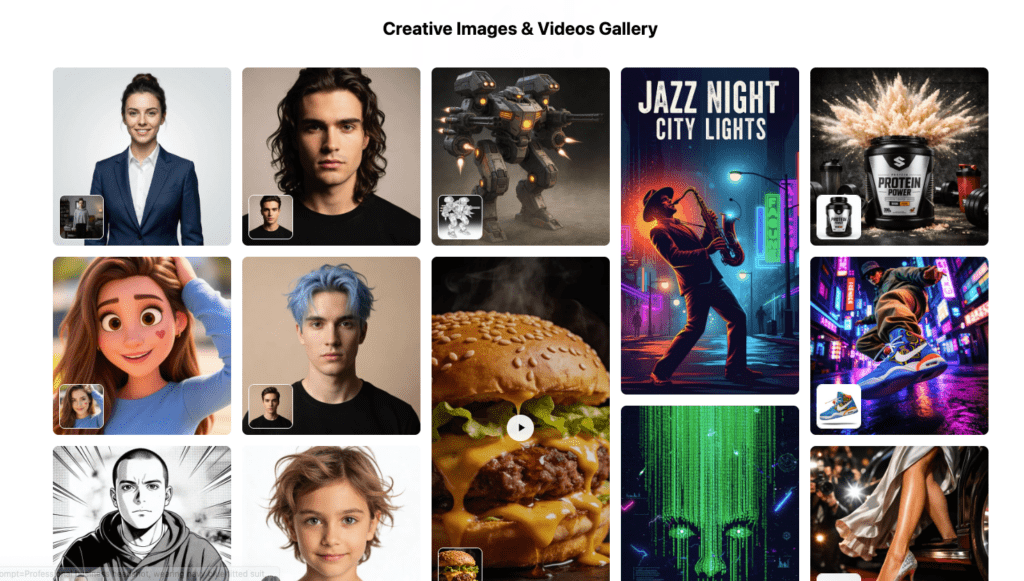
Key Features / Pros & Cons / Pricing
I reach for Cutout.pro when I want clean cutouts, believable drop shadows, and quick batch consistency. In my January store refresh (186 images), it averaged ~4.2s per image for background removal and saved me about 3–5 minutes per SKU compared to manual masking in Photoshop. Well, that settled nicely.
- Key features I actually use: background removal, portrait refinement (hair edges are solid), product shadows/reflections, upscaler, and quick retouch for dust. The batch tool with presets keeps my margins and canvas size identical across a whole collection.
- Pros: sharp edges without crunchy halos: realistic soft shadow generator: stable batch speeds: simple credit model for occasional pushes.
- Cons: generative fills are improving but not as nuanced as Photoshop: color matching between comps sometimes needs a touch‑up.
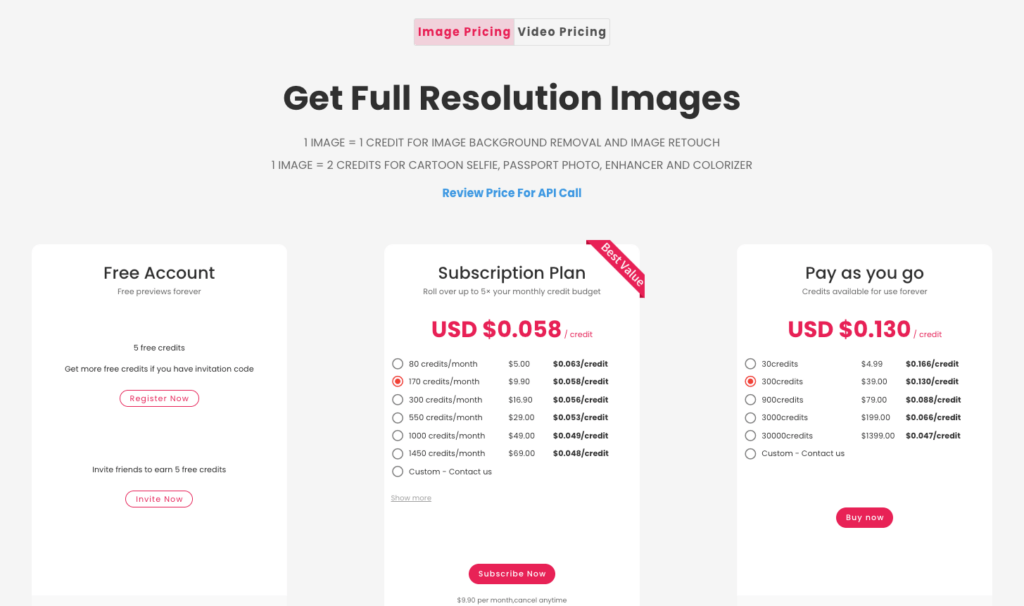
Pricing: Typically credits or subscription. Historically, it’s been one of the more affordable options per processed image. Check the current Cutout.pro pricing page for exact numbers, credit bundles fluctuate.
If you only adopt one tool for e‑commerce momentum, this is the one that quietly clears the path so you can focus on styling. “There… just right.”
2 Adobe Photoshop AI — Best for Professionals
Photoshop’s Generative Fill, Generative Expand, and Remove are now sturdy enough for daily production. In my February campaign composites, I rebuilt backgrounds, extended canvases for vertical reels, and healed wrinkles on packaging without that plasticky smear. When it sings, it’s magic: when it misfires, two more prompts usually land it.
- Why it matters: pixel‑level control and full stack, masks, blend modes, color management. No ceiling for complex files.
- Strengths: best‑in‑class generative fill control, non‑destructive workflows, deep plugin ecosystem.
- Watch‑outs: heavier learning curve: sometimes overkill for “just remove the background.”
- Pricing: Subscription via Creative Cloud: see Adobe’s official notes on Generative Fill in Photoshop and current plan pricing.
For client deliverables where scrutiny is high, this is the safety net. Past me was so serious: present me lets Photoshop do the tedious 80% and saves the finesse for the end.
3 Luminar Neo — Best for Landscape & Portrait
Luminar Neo leans into mood. Relight, Color Harmony, Skin AI, tools that make portraits and outdoor shots feel intentional rather than filter‑y. I used it on a winter lookbook in January: softened skin gently, lifted eyes, and added a whisper of atmosphere. Ahh, that’s nicer.
- Strengths: portrait clean‑up that keeps pores: Relight for backlit fixes: sky/structure tools that don’t scream “edited.”
- Limits: Not my pick for product cutouts: batch is fine but less templated for strict e‑com specs.
- Pricing: License or subscription: check Luminar Neo’s features and current offers.
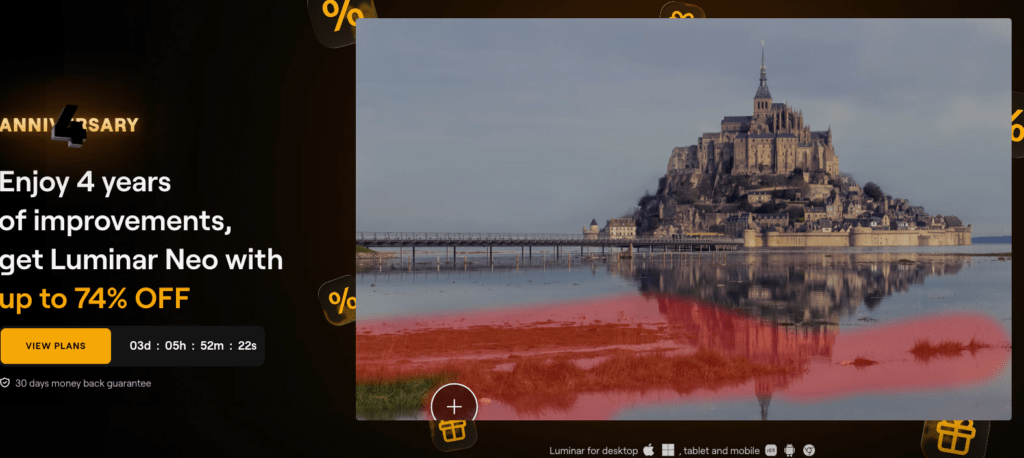
If your grid swings between people and places, Neo brings that “Mmm, that feels good” finish with minimal fiddling.
4 Canva AI — Best for Social Media Creators
When I’m building quick carousels or story covers, Canva’s Magic Studio gets me from blank to branded in a coffee’s lifespan. Background remover is dependable: Magic Grab and Magic Expand help me reframe assets for different ratios without starting over. And templates, thousands that don’t feel like a trap once you tweak fonts and color styles.
- Strengths: speed, templates, team sharing, brand kits. Great for posts, ads, covers, and light photo touch‑ups.
- Limits: Generative fills are decent but lack Photoshop’s precision: color grading tools are basic.
- Pricing: Free tier: Pro adds brand features and higher‑res exports.
For social and marketing assets, it’s like a friendly assistant who lays everything out neatly so you can sprinkle the style. There, done.
5 Fotor — Best Free Option
Fotor is my recommendation when someone DMs, “I need free, today.” Background removal, beautify, simple HDR and color, done in a browser. It got me through a quick volunteer poster last month when I didn’t have my usual toolset handy.
- Strengths: accessible, quick results, no steep learning curve.
- Limits: Edges can look a bit soft on tricky hair: fewer pro‑level controls.
- Pricing: Free tier with watermarks/limits: Pro tiers are still budget‑friendly. See Fotor’s plans.
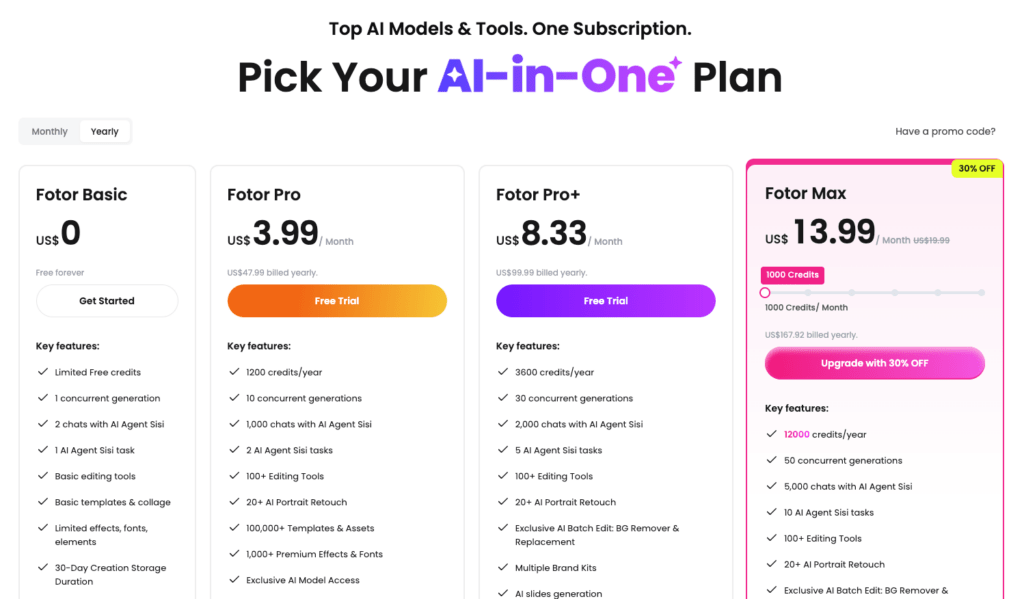
Is it perfect? No. Is it surprisingly capable for everyday needs? Wait… that’s actually lovely.
6 PromeAI — Best for Product & Architectural Photo Editing
For product and architectural scenes, PromeAI‘s vibe is “put the object in the right light and space.” In January I relit a stainless bottle set onto a concrete vignette and got believable specular highlights with minimal prompting, little quiet happy moment~
- Strengths: AI relight, material‑aware fills, scene suggestions for product staging: useful for renders blending into real photos.
- Limits: Interface still evolving: color consistency occasionally needs a nudge in post.
- Pricing: Subscription/credits.
If your work lives in catalogs, store pages, or look‑dev for packaging, this one’s worth a spin.
7 Pixlr — Best Browser-Based Editor
Pixlr is the lightweight, open‑and‑go option. On my travel laptop (aka, the potato), it still removes backgrounds, upscales small logos, and does quick retouch. Perfect for speed runs when I don’t want to boot the heavy apps.
- Strengths: fast start, works on modest hardware, handy AI tools in a clean UI.
- Limits: Complex composites aren’t its lane: export options are simpler.
- Pricing: Free with ads: Premium tiers are inexpensive. Explore Pixlr’s features.
Hehe, nice when it works, and it usually does.
How to Choose the Right AI Photo Editor
For Photographers
Look for subtlety: skin texture retention, color harmony, and relight that respects highlights. Luminar Neo or Photoshop shine here. If batch exporting client galleries, test a preset pass on 30+ shots and inspect pores, hair edges, and skies for repetition.
For E-commerce
You want speed + sameness. Cutout.pro for background, shadows, margins: Photoshop for hard edge fixes or composites: PromeAI for staged scenes. Build a template that locks canvas, padding, and shadow style, then batch, save 10+ minutes per SKU, easily.
For Casual Users
Canva or Fotor get you polished fast: birthday posters, profile pics, story frames. Start with templates, swap brand colors, and nudge typography. If it rescues my sleepy brain at 10 p.m., it’ll treat you kindly too.
All right, rest easy now. Beautiful design doesn’t have to feel heavy. Try one on your next project and see how the edges soften, the colors breathe.
Previous posts:
How to Write Prompts for Vidu Q3 Native Audio (Dialogue + SFX + BGM)
Clean Assets AI Video: Why Seedance 2.0 Results Start Before You Hit Generate
Remove Video Background Without Green Screen: A Practical Guide