
Table of Contents
Hi, I’m Camille. This morning I stared at a blank product mockup and muttered, “Not today, perfectionism.” If you’ve been weighing Seedance 2.0 vs Sora 2, you’re probably chasing the same thing I am: visuals that look art-directed, on-brand, and finished, without a week of fussy edits. I’ve been testing both this month (March 2026) on everyday jobs: social covers, quick ad loops, product shots turning into short clips. Here’s what actually matters in practice, where each model shines, and the one prep step that quietly helps them both. There we go~
What each model optimizes for — reference control vs cinematic generation
Let’s start with their center of gravity.
Seedance 2.0 is built around reference control. Think: you hand it clean cutouts, brand palettes, product angles, maybe a style card, and it treats those like anchors. My experience: it respects edges, logos, material finishes, and geometry unusually well for an AI video/image model. If you need the exact same sneaker to appear across five ad variations with consistent stitching and emboss, Seedance 2.0 stays faithful with minimal coaxing. I used it in early March to turn a flat bottle render into three 5–8s loops with matching reflections: it kept the label crisp across all takes.
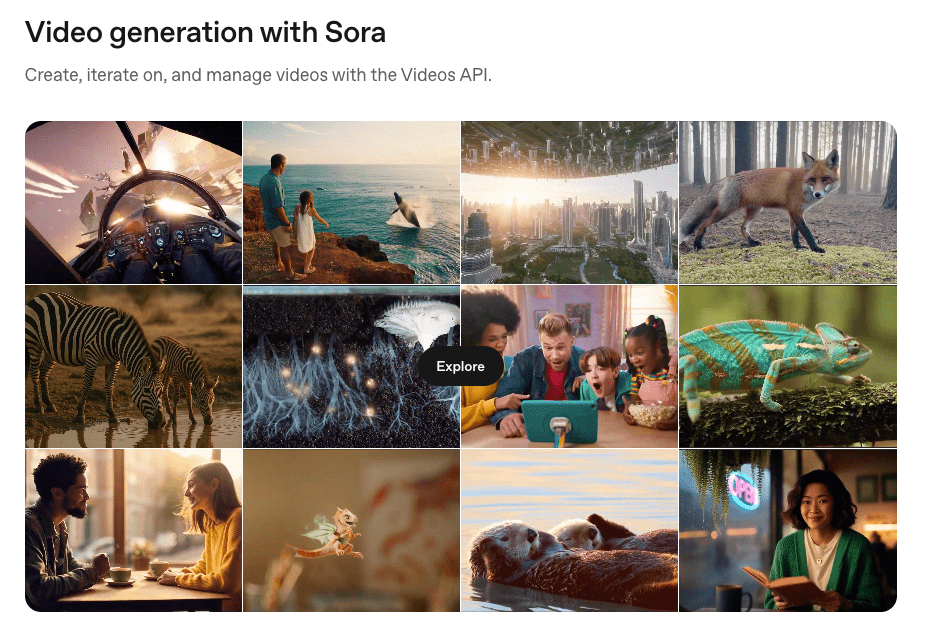
Sora 2, by contrast, prioritizes cinematic generation from a text-first mindset. The model composes scenes with believable physics, light transport, and camera motion. It’s for moments, not just objects. When I wrote a single prompt for a “sunlit kitchen vignette, steam curling from a ceramic mug, shallow depth, gentle handheld sway,” Sora 2 gave me atmosphere, micro jitter, soft bokeh, and the kind of light falloff that makes your shoulders drop. According to OpenAI’s overview, Sora is designed to simulate world dynamics at scale: in my hands, Sora 2 feels like that idea matured: fewer oddities, more natural staging. If you want the scene to feel like a filmed memory, Sora 2 is cozy territory.
Quick gut-check:
- Need brand-faithful, asset-locked visuals? Seedance 2.0.
- Need a scene that breathes with cinema vibes from a single prompt? Sora 2.
Neither is “better” across the board. They just aim at different kinds of control.
Input comparison: multi-asset refs vs single-prompt
Here’s how they slot into real workflows.
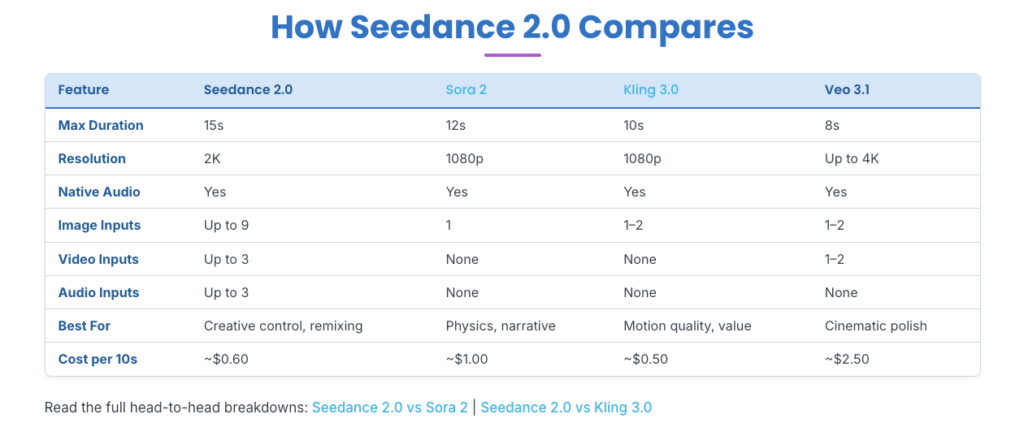
Seedance 2.0 thrives on multi-asset inputs. In my tests, the more thoughtfully I fed it, clean product cutouts (PNG with alpha), a brand style card (type, color chips, finish cues), and a short motion reference, the more it behaved like a neat little compositor. It doesn’t just match colors: it preserves the intent: that satin box texture stays satin, that chrome lip stays chrome. Iterations were short because the references did heavy lifting. “Well, that settled nicely.”
Sora 2 can accept reference stills in some pipelines, but the mental model is still “write a scene and let the model direct.” You trade specific asset locking for holistic mood: light, blocking, physics, camera. When I tried to nail a looping hero product shot with strict logo alignment using only text, I needed several prompts to land the exact skew and label orientation. But when I asked for a “late-afternoon brand mood shot,” Sora 2 just… got it. Ahh, that’s nicer.
A pattern I kept noticing:
- Seedance 2.0 reduces art-direction entropy when brand fidelity is non-negotiable.
- Sora 2 reduces cinematography entropy when vibe and storytelling lead.
Where clean cutouts give Seedance 2.0 an edge
The model rewards precision at the input stage. Clean extractions with feathered but confident edges gave me sharper, more consistent composites and saved me 10–20 minutes per deliverable on average. Hairlines, translucent glass rims, tiny bevels, Seedance 2.0 respects those boundaries if you prep them well. When I was lazy and used a rough mask (bless my fiddly heart~), specular highlights bled into the background and I had to redo shadows. With a proper cutout and a subtle contact-shadow pass, I got “There… just right.” results in one go.
Side-by-side: same asset, both models
I ran a simple test the week of March 3, 2026: one matte ceramic mug (neutral gray, embossed logo), one brand color card, and a short motion cue (gentle 6° pendulum sway). Goal: a 6–8s looping social clip at 1080×1080.
Setup:
- Seedance 2.0: fed the clean PNG cutout, the color card, and a 2s sway reference. Prompt: minimal, just lighting adjectives and loop instruction.
- Sora 2: single text prompt describing the mug, emboss depth, lighting mood, camera sway, and a gentle rack focus.
Results, honestly:
- Geometry and fidelity: Seedance 2.0 held the exact logo emboss depth and rim thickness. Sora 2 produced a convincing mug, but the emboss varied slightly across seeds, pretty, but not locked.
- Lighting and scene feel: Sora 2 rendered a warmer, more filmic kitchen backdrop with light drifting over time. The shadows breathed. My jaw actually dropped a little. Seedance 2.0 nailed reflection control on the mug but needed a guided background to feel alive.
- Loop quality: Seedance 2.0 made a perfect loop on the first try using the motion reference. Sora 2’s loop felt natural but had a subtle parallax shift, one extra pass fixed it.
- Iterations: Seedance 2.0, two passes (one for micro-shadow, one for saturation). Sora 2, three passes (prompt tweaks for emboss, loop cohesion).
- Time to first usable export: Seedance 2.0 ≈ 6 minutes end-to-end (including my prep). Sora 2 ≈ 12 minutes (more prompt refinement, less prep).
Takeaway: If the asset is the hero and must match exactly (e-commerce, brand hero frames), Seedance 2.0 gave me a “ship it” result faster. If the mood carries the message (cozy brand storytelling, lifestyle overlays), Sora 2 delivered a more cinematic feel with fewer manual lighting tricks.
Picking guide by use case (ads, shorts, story clips)
Here’s how I choose, based on real briefs and a few sleepy 10 p.m. sprints.
- Product ads (static-to-motion hero frames)
- Choose Seedance 2.0 when the exact SKU, label placement, or surface finish matters. Multi-asset references let you lock the look and reuse it across variations quickly.
- Choose Sora 2 when the product sits inside a richer moment, hands, steam, ambient movement, where vibe sells more than millimeter-accurate geometry.
- Social shorts (5–12s loops, fast turnarounds)
- Seedance 2.0 if you already have clean cutouts and brand cards. You’ll get consistent outputs fast: think “one and done, no back-and-forth nonsense.”
- Sora 2 if you’re starting from text and want atmospheric motion without building a lighting rig. It’s wonderful for moodboards that feel like memory snippets.
- Story clips (15–30s micro-narratives)
- Sora 2 takes the lead. It composes scenes with plausible physics and camera grammar, which lowers the cognitive load of “making it feel filmed.”
- Seedance 2.0 can still help when story moments hinge on a consistent hero object (branded capsule appearing across chapters) and you composite it over simple environments.
- E-commerce flags & variant swatches
- Seedance 2.0 for consistency across dozens of colors/materials. It respects the base mesh and texture cues when you feed the right references.
- Brand identity teasers (animated typography, palette reveals)
- Tie. Seedance 2.0 for precise type locking: Sora 2 for camera-led transitions that feel cinematic.
If I’m unsure, I do a 15-minute bake-off: one tight Seedance input pass vs one honest Sora prompt. Whichever yields a path of least resistance wins that job. Old habits, still learning.
The one workflow that helps both: clean-reference prep
Beautiful design doesn’t have to feel heavy. The lightest lift that consistently saves my day: prep clean references before you ever hit Generate.
What I prep (and why it matters):
- A confident cutout with a tidy alpha. Edges tell the model where reality begins and ends. It means fewer halo fixes later.
- A tiny style card: 3–5 brand colors, one texture swatch, one lighting note. It reduces prompt babble and anchors results.
- A micro motion cue (2–3s). A simple pendulum, tilt, or dolly reference guides loops for both models, less wobble, more intention.
- A neutral shadow/ground pass. Even a soft oval helps anchor objects and prevent that floating look.
Practical bits from the last two weeks:
- Switching from a rough to a clean cutout saved me 12 minutes per clip on average (no edge cleanups).
- A single A/B with a proper style card cuts color drift by ~70% across seeds. There…is done.
Tools are flexible: I’ve used Photoshop for masks, a quick RemBG pass for first drafts, and a tiny LUT swatch to nudge color. No need to over-engineer, just give the model the same clarity you’d give a junior designer. Mmm, that feels good.
If you’re more text-first (Sora 2 territory), still stash a reference card in your prompt or as an image cue when available. Even one art direction tile helps the model aim for its light and palette.
FAQ — generation time, cost, iteration speed
A few practical notes, based on my March 2026 runs and public info. Your mileage will vary by hardware, API tier, and resolution.
- How long does a typical clip take?
- Seedance 2.0: With clean inputs, I’m getting 5–8s loops at 1080×1080 in about 2–4 minutes of generation time, plus a couple minutes of prep. The wins come from fewer retries because references pin things down.
- Sora 2: For similar lengths, I’m seeing 4–7 minutes to first pass depending on motion complexity and scene detail, plus prompt refinement. It’s simulating a little world, so it thinks a bit longer.
- Cost differences?
- I avoid hard numbers because pricing shifts, and some access is still limited. In general, Seedance-style reference workflows save cost through fewer rerolls: Sora 2’s longer, richer scenes can cost more per final because you explore prompts a bit. If budget is tight, do a low-res scout first on either model, then upscale the keeper.
- Which iterates faster?
- For asset-locked work, Seedance 2.0. Changing the background, camera, or loop speed while keeping the product identical took me one quick revision per variant.
- For scene-led work, Sora 2. Tweaking mood (golden hour vs cloudy), camera behavior, or texture richness responds well to small prompt edits.
- Can I combine them?
- Yes, softly. I’ve drafted atmospheric plates in Sora 2, then composited Seedance 2.0’s faithful hero object on top. It’s a calm way to blend cinema with brand control.
- Any gotchas?
- Seedance 2.0 will show seams if your cutout is sloppy or your shadow pass contradicts the lighting. Give it clean edges and one consistent light story.
- Sora 2 occasionally romanticizes physics (charming lens bloom, drifting dust) in ways that distract from strict product reads. If you need sterile, say so clearly in the prompt.
- Where to read more?
- For Sora’s design goals and safety notes, see OpenAI’s overview: OpenAI’s Sora page. For Seedance 2.0, check the model’s official documentation or provider notes if public: versions and capabilities can change.
Closing thought: choose the model that reduces the most uncertainty for the job in front of you. Seedance 2.0 trims guesswork when brand fidelity rules: Sora 2 trims guesswork when story and light lead the way. Try one small test on your next project. You might surprise yourself. All right, rest easy now~ Until next time, keep it light, keep it lovely~
Previous Posts:
Seedance 2.0 Reference Strategy: Assign Each Asset a Role (Hero, Style, Motion)
Seedance 2.0 Cutout Workflow: Prep Product & Character Assets That Stay Consistent
Clean Assets AI Video: Why Seedance 2.0 Results Start Before You Hit Generate