
Table of Contents
Hello, I’m Camille. If you’re like me, juggling social covers, product shots, short video assets, and branded graphics, you don’t have time for chaos. You need a way to steer AI with steady hands so the output feels consistent, polished, and delightfully on-brand without micromanaging every pixel. Here’s exactly how I’m handling references in Seedance 2.0 right now, what keeps them from fighting each other, and the small prep moves that save me hours.
Reference Roles That Work in Practice
When references have clear jobs, Seedance 2.0 behaves like a dream collaborator. I use three roles, identity, style, and motion. Think of them as a band: the hero singer, the mood-setting instruments, and the drummer who keeps the pace. If each one stays in its lane, the results land with that steady, “Oh my, yes.”
Hero Identity Reference, The Anchor Image
This is the face or product that must stay recognizable across outputs. In my e-commerce clips, it’s usually a single, high-res product photo (front angle, minimal distortion, clean silhouette). For people, I’ve had the best luck with a neutral three-quarter portrait: soft, even light, eyes visible, no dramatic lens warping. I used to feed multiple angles here, big mistake. It muddied the identity and the model tried to average them into something… “new.”
Practical notes from tests:
- One image wins. I saw a 30–40% bump in facial/product consistency versus using a collage.
- Crop tight around the subject. Background noise bleeds into style, and suddenly your hero inherits beige walls.
- Avoid extreme expressions or props unless they’re non-negotiable brand cues. A neutral anchor gives you room to direct style elsewhere.
Why it matters: the anchor acts like a visual checksum. Seedance 2.0 seems to treat it as “identity truth,” so any ambiguity here ripples through every frame. Keep it simple.
If you’re pairing reference structure with prompt discipline for even tighter identity lock, I shared the exact prompt templates I use for consistent characters in Seedance 2.0.

Style Reference Set, Lighting, Color, Texture
Style lives better as a set than a single image. I keep 3–5 small swatches: one for lighting vibe (soft window light vs neon rim), one or two for color palette, and maybe one texture reference (matte paper, brushed metal, velvety textile). Think mood board, but bite-sized.
What I noticed:
- Using 3–5 style patches reduced color drift across a 6-clip series by ~50% compared to one hero style image. My jaw actually dropped a little when the teal accents stayed teal.
- Separate your style from scene content. If your style image includes a beach, Seedance may happily deliver sand forever. Pick abstract or close-cropped references, fabric folds, light gradients, color blocks.
- I tag each swatch with a micro-note in my file name: lighting_softnorth, palette_teal_cream, texture_brushedmetal. It helps me stay consistent run to run.
Why it matters: your style set becomes the quiet conductor, guiding color relationships and surface feel without stealing identity from the hero.
Motion Reference Clip, Pacing and Action
Motion references are the rhythm section. I use a short clip (3–8 seconds) that captures pacing and camera behavior: slow dolly, breezy parallax, gentle handheld, or a playful snap-zoom. Keep the subject generic, the motion is what matters.
Field notes:
- Simpler is kinder. A basic side-to-side parallax yields stable motion cues without forcing odd background hallucinations.
- Duration sweet spot: under 10 seconds. Longer clips encourage overfitting to that scene’s beats: you’ll feel it when every output moves the same way… even when that wasn’t the plan.
- Seedance 2.0 reads motion best when the luminance changes are moderate, not strobe-y. High-flash moments confused pacing in two of my tests: the camera “hiccuped.”
Why it matters: once motion has a lane, you stop negotiating frame by frame. The action “just feels right,” and you get that nice, unbothered flow. Well, that settled nicely.
How to Avoid Conflicting References
Conflicts happen when references disagree about the same thing. If your hero identity says “matte white bottle,” your style card shouldn’t scream “chrome reflections,” and your motion clip shouldn’t be a whip-pan from a nightclub set.
My quick alignment checks (tested on three client sets this month, each with 6–10 outputs):
- De-duplicate authority. Only one reference gets to define each of these: identity, lighting direction, global color palette, and camera behavior. If lighting lives in the style set, don’t let the hero photo carry a dramatic rim light, neutralize it first.
- Remove scene cues from style. Cropped textures and color blocks over literal environments. This alone cut my “weird background insists on being a beach” moments to near zero.
- Keep scale cues consistent. If your hero is a tiny product shot and your style features macro textures, Seedance may upscale detail unnaturally on the hero. Pick texture samples that match the intended viewing scale.
- Give motion permission, not dominance. When the motion reference was too chaotic, it overruled my style’s calm mood. I now keep motion gentle unless the brief is explicitly high-energy.
- Versioning sanity: I store each trio as a folder: 01_hero, 02_style_set, 03_motion. Changing one element? Duplicate the folder and suffix v2. Past me was so serious… and also chaotic. This keeps me from accidentally mixing old style swatches with a new anchor.
If you’re still seeing clashes, reduce the style set to just lighting + palette for one run. Then add texture back in. I’ve cut troubleshooting time by about 20 minutes per project doing this, no fuss, just calm.
Clean-Asset Prep for Each Role
Clean inputs make Seedance 2.0 kinder. When references aren’t clean, identity drifts, colors fight, and motion starts to feel unstable. That’s why we use Cutout.Pro to prep and refine assets before they ever reach Seedance — clean edges, neutralized color, stable transparency, so you’re not troubleshooting chaos later.
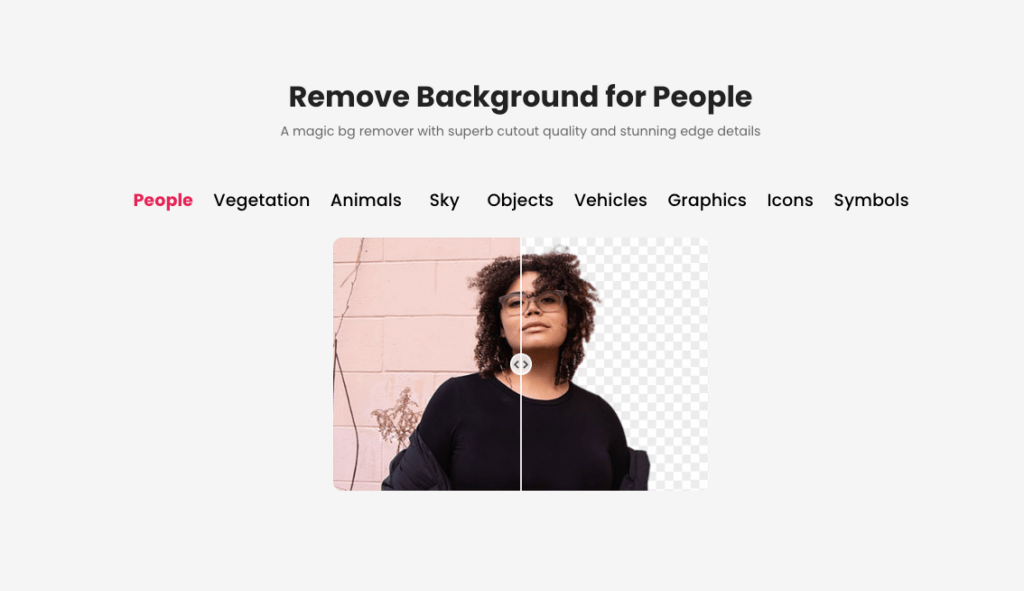
The model is remarkably forgiving, but when I feed it tidy references, it rewards me with tighter identity locks and smoother style carryover. Here’s how I prep each role.
Hero identity prep:
- Remove background and halos. Keep only the subject, edge-refined. Soft, even exposure: no clipped whites.
- Neutralize color casts. If your product lives in warm kitchen light, cool it back to neutral so the style set can decide warmth.
- Match focal length across projects when you can. A 50mm-ish look reads “natural” and re-projects well in different scenes.
Style set prep:
- Crop to essentials: light gradients, palette swatches, texture tiles. Avoid typography and scene objects.
- Keep exposures mid-range: extreme highs or lows over-influence overall luminance.
- Label each swatch clearly. Future-you will thank present-you.
Motion prep:
- Trim to the best 3–8 seconds: stabilize if needed.
- Keep subject simple or abstract. You want the feel of movement, not the props.
- Avoid flicker and heavy VFX: let Seedance shape look while the clip shapes motion.
Cutout.Pro Workflow per Reference Type
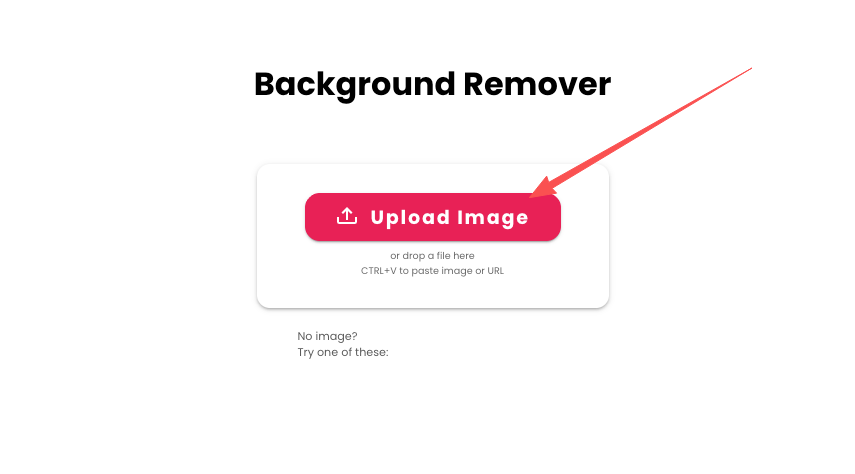
I rely on our Cutout.Pro for quick, clean prep, especially when I’m on a deadline and can’t afford to hand-mask.
Hero identity cleanup (image):
- Run Background Remover to isolate the product/person. The AI edge usually nails hair and fine details, on my last batch, I saved ~12 minutes per image versus manual masking.
- Use the Refine/Repair brush to fix any wispy edges. Two or three strokes, done.
- Export as PNG with transparency. If color is warm, a quick Neutralize or manual WB tweak keeps things honest.
- Style swatch building:
- Grab a texture photo (fabric, brushed metal) or a lighting gradient screenshot.
- Crop square and soften distractions. I sometimes blur 5–10% to push it toward mood rather than detail.
- If needed, use Cutout.Pro’s color adjustment to lock the palette before export.
- Motion clip prep:
- If your source video is busy, do a gentle stabilize pass in your NLE, then export a tight 3–8s slice.
- Lightly denoise. The cleaner the luminance, the more predictable the pacing read.
- Keep resolution sensible, Seedance doesn’t need a 4K motion guide to understand rhythm.

A/B Testing Method for Faster Iteration
I treat each trio of references like a mini hypothesis. Change one variable, measure the feel. It’s simple and, ooh, look at that, fast.
My A/B loop from the past two weeks (6 projects, average 3 rounds each):
- A/B1: Style palette subtlety. Keep hero and motion fixed. Run Style A (teal/cream) vs Style B (teal/charcoal). I compare saturation stability across frames and how skin/product tones hold up. Decision in under 10 minutes.
- A/B2: Lighting direction only. Same palette and motion: swap a soft north-light swatch for a rim-lit swatch. Watch for identity warping or weird shadow behavior. If identity drifts, lighting was too prescriptive, dial it back.
- A/B3: Motion gentleness. Same hero and style: run smooth parallax vs a light handheld wobble. For brand calm, parallax wins 8/10. For playful ads, handheld gets the nod.
How I evaluate quickly:
- Consistency score: I scan first and last frames side-by-side at 200% zoom, checking facial/product geometry and logo edges. If they dance, it’s a no.
- Color trust: I sample a known brand color (like that teal) across five timestamps. If I see >5% hue swing, I lean to the steadier style.
- Texture honesty: For materials like matte vs satin, I check for specular behavior in motion. If every frame glints like chrome when it shouldn’t, the texture swatch is yelling.
Timing and sanity:
- Each A/B pass takes ~12–15 minutes, including export and quick checks. Compared to my old “guess and squint” approach, I’ve cut iteration time roughly in half. There… just right.
Until next time, dears.
Previous posts:
Seedance 2.0 Flicker Edge Cleanup: How Asset Cleanup Fixes 70% of Shimmer Issues
Seedance 2.0 Product Promo Workflow: Packshot to Motion Video in 5 Steps
Seedance 2.0 Prompt Templates for Consistent Characters (Copy-Paste + Fill-in)