

Table of Contents
Long time no see~ I’m Camille. Have you ever stared at a folder of 500 product photos and thought, “There has to be a better way”? Same. I’ve been there—manually dragging images into browser tools, one by one, long past the point where it was even a little fun.
That’s when I finally sat down and wired up a remove background API properly in Python. And oh, it changed things. Not in a dramatic, confetti-dropping way—more like that quiet satisfaction when your code is just… runs cleanly at 2 a.m. and you wake up to a folder of perfectly cut-out images.
This guide is for anyone who’s moved past the manual stage and needs a real integration: batch processing, production-grade retries, queue design, and a clear-eyed look at common errors. Let’s take a gentle walk through it.

When You Need an API (Batch, Apps, Pipelines)
The browser tool is lovely for one-offs. But the moment you’re handling more than a handful of images regularly, you’re going to feel it. The copy-paste, the waiting, the tab-switching—it adds up to a lot of little friction points across a day.
A remove background API makes sense when:
- You’re processing batches of product images for an e-commerce store (think: new SKUs every week, seasonal refreshes). For example, many e-commerce teams automate background removal exactly for this reason — preparing clean product images for listings and catalogs, as explained in this guide on removing backgrounds from product photos for e-commerce.
- You’re building an app or internal tool where users upload photos and expect instant results
- You have an automated pipeline—say, images coming in from a photographer’s delivery folder, needing processing before hitting a CMS
- You’re integrating with downstream workflows: resizing, compositing, watermarking—all in sequence
Past me would have kept putting this off, convinced it was complicated. Bless her fiddly heart. It’s actually quite approachable once you see it laid out clearly.
Python Quickstart (High-Level Steps)
Most removed background APIs follow the same friendly pattern: send an image, get back a transparent PNG. If you’re not ready to build a full API pipeline yet, there are also simpler workflows for batch removing backgrounds from multiple images at once using automation tools.The requests library handles heavy lifting, and you’ll be up and running in a few minutes.
Auth + Request
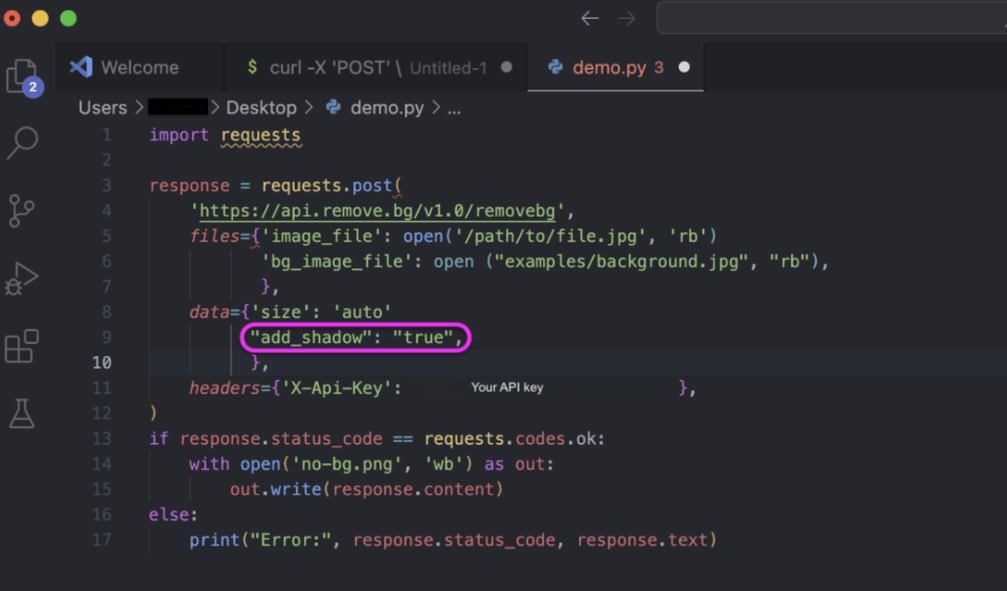
Your API key lives in the request header—typically as X-Api-Key. Keep it out of your source code; an environment variable works perfectly here.
import requests
import os

API_KEY = os.environ.get("REMOVEBG_API_KEY")

response = requests.post(
    'https://api.remove.bg/v1.0/removebg',
    files={'image_file': open('product.jpg', 'rb')},
    data={'size': 'auto'},
    headers={'X-Api-Key': API_KEY},
)
The size: auto parameter selects the highest resolution . Your credits allow—a sensible default for most workflows. You can also pass image_url instead of a file if your images are already hosted somewhere.
Response Handling
A clean response comes back with status 200 and raw image bytes in the body. Write them directly to a file:
if response.status_code == requests.codes.ok:
    with open('product-no-bg.png', 'wb') as out:
        out.write(response.content)
else:
    print("Error:", response.status_code, response.text)
Ahh, that’s nicer. Two dozen lines and you have a working integration. Now let’s make it production-worthy.
Production Patterns
Here’s where things get genuinely interesting—because a script that works on your laptop and a system that runs reliably at scale are two different things. These patterns are the ones I keep coming back to.
Retries and Backoff
Networks hiccup. APIs have bad moments. If your script just gives up on the first failure, you’ll be chasing mysterious gaps in your output folder at odd hours.
The requests library lets you attach a custom retry strategy to a Session by mounting an HTTPAdapter configured with urllib3.util.Retry—and all subsequent requests through that session will automatically retry with backoff.
from requests import Session, adapters
from urllib3.util.retry import Retry

retries = Retry(
    total=5,
    backoff_factor=1,
    status_forcelist=[429, 500, 502, 503, 504]
)

session = Session()
adapter = adapters.HTTPAdapter(max_retries=retries)
session.mount('https://', adapter)
session.mount('http://', adapter)
The backoff delay follows the formula {backoff_factor} × (2 ** ({number of retries} − 1)), giving you an exponentially increasing wait: roughly 1s, 2s, 4s, 8s. Set it to at least 1 so you’re not hammering a struggling server.
One important nuance: 429 (Too Many Requests) deserves a spot in your status_forcelist. Rate limit responses are temporary by nature, and a patient retry with increasing delay almost always resolves them without any manual intervention.
If you want even finer control—say, you read the Retry-After header from a 429 response—the urllib3 Retry documentation has a full breakdown of every parameter available, including respect_retry_after_header (it’s True by default, which is exactly what you want).
Async Queue Design
Processing images one at a time is fine for small batches. For anything larger, an async queue design keeps your pipeline moving without overwhelming the API.
The idea is simple: instead of sending 200 images sequentially, you send a controlled number concurrently—maybe 5 or 10 at a time—using asyncio and aiohttp. Each worker picks the next image from a queue, processes it, and writes the result.
import asyncio
import aiohttp
import os
from pathlib import Path

CONCURRENCY = 5  # tune based on your rate limits

async def process_image(session, path, output_dir, semaphore):
    async with semaphore:
        async with session.post(
            'https://api.remove.bg/v1.0/removebg',
            data={'size': 'auto'},
            headers={'X-Api-Key': os.environ['REMOVEBG_API_KEY']},
            data=aiofiles.open(path, 'rb')  # simplified
        ) as resp:
            if resp.status == 200:
                out_path = Path(output_dir) / f"{Path(path).stem}-no-bg.png"
                out_path.write_bytes(await resp.read())

async def main(image_paths, output_dir):
    semaphore = asyncio.Semaphore(CONCURRENCY)
    async with aiohttp.ClientSession() as session:
        tasks = [process_image(session, p, output_dir, semaphore) for p in image_paths]
        await asyncio.gather(*tasks)
The semaphore is your politeness dial. Turn it down if you’re hitting rate limits; turn it up carefully if you have higher-tier API access. No fuss, just calm.

Webhook/Callback Strategy (If Used)
Some APIs—especially for heavier video or high-resolution image jobs—support a webhook model: you submit the job, provide a callback URL, and the API pings you when it’s done rather than making you wait on a long-lived connection.
If the API you’re working with supports this pattern, the flow looks like this:
- Submit the image job with your
callback_urlin the request body - Receive a
job_idimmediately (your request returns in milliseconds) - Your server endpoint receives a POST from the API when processing completes
- Parse the result payload and write the output file
This is especially handy for batch pipelines where you want to decouple submission from result handling. Even if the API you’re using doesn’t have native webhook support, you can simulate it with a simple polling loop that checks job status every few seconds.
Common API Errors (and Fixes)
Okay, so here’s the part that confused me at first. The error codes are pretty logical once you know what each one is actually telling you.
Timeouts
A timeout means the request was sent but no response arrived within your limit. This can be a slow network, a busy server, or an image that’s genuinely large and taking longer to process.
Fix: set an explicit timeout on your request (two values—connect timeout and read timeout—are better than one):
response = requests.post(
    'https://api.remove.bg/v1.0/removebg',
    files={'image_file': open('large-image.jpg', 'rb')},
    data={'size': 'auto'},
    headers={'X-Api-Key': API_KEY},
    timeout=(10, 60)  # 10s to connect, 60s to read
)
The (connect, read) tuple form means you won’t wait forever for a hung connection, but you’ll give a legitimate large-image job enough time to finish. Pair this with your retry strategy and most transient timeouts resolve themselves quietly.
Rate Limits
A 429 Too Many Requests is the API’s way of saying “slow down a little, friend.” It’s not a failure—it’s a signal.
A good rule of thumb: limit retries to 3–5 attempts maximum. This prevents too much load on the server and reduces the risk of being blocked. Handle the case where max retries are exceeded gracefully—log the failure and move on rather than crashing your whole batch.
For pipelines processing hundreds of images, consider adding a small amount of time.sleep(0.5) between each submission even when things are going smoothly. Proactive throttling is much friendlier than reactive rate-limit handling, and it keeps your pipeline humming along without bumping into walls.
Cost + Performance Checklist
Before you scale up, a quick pass through these points can save you real money and headaches:
Image format: If you don’t need transparency, request JPG output—it’s smaller and faster to generate than PNG. For transparent outputs, the ZIP format (where supported) can be up to 80% smaller than PNG and 40% faster to produce. Worth checking if your API supports it.
Resolution: Requesting full or 4k resolution costs more credits than auto or hd. Match the resolution to what you actually need—a social media thumbnail doesn’t need 50MP processing.
Batch vs. sequential: For 10 images, sequential is fine. For 100+, the async queue approach above will cut your total processing time significantly.
Error logging: Log every non-200 response with the image path, status code, and timestamp. When something goes wrong at 3 a.m., you’ll want to know exactly which images need reprocessing.
Credit monitoring: Check your account balance programmatically before large batch runs. Most APIs expose a /account or /credits endpoint—a quick preflight check can prevent a half-finished batch from leaving you with incomplete output.
For teams building this into larger Python applications, the Python Requests library documentation is worth bookmarking—it covers sessions, adapters, and advanced auth patterns that come in handy as your integration grows.
FAQ
Can I process images from a URL instead of uploading a file? Yes—most APIs accept an image_url parameter as an alternative to file upload. Handy if your images are already hosted on a CDN or in cloud storage. Just pass the URL string instead of a file object.
What image formats are supported? JPG, PNG, and WebP are universally supported. Some APIs have recently added WebP output support too, which is worth using for web-facing workflows. Always check the API’s changelog for new format additions—they can meaningfully affect file sizes.
How do I handle images where the background removal looks wrong? Some edge cases—transparent materials, busy backgrounds, fine hair—genuinely trip up AI models. Some images — especially those with hair, glass edges, or soft boundaries — require more advanced processing, similar to the techniques used when removing backgrounds from hair and glass edges in photos. Most APIs let you specify a foreground_type parameter (person, product, animal, etc.) which narrows the model’s focus and often improves results on tricky images.
Is it safe to store my API key in environment variables? Yes, that’s the right approach. Never hardcode API keys in source files that might end up in version control. For production deployments, a secrets manager (like AWS Secrets Manager or HashiCorp Vault) is even better. The OWASP secure coding practices guide has solid guidance on credential management if you want to go deeper.
What’s a reasonable concurrency level for async processing? Start conservative—5 concurrent requests is a sensible default for most API tiers. Monitor your 429 rate and adjust slowly. Some APIs publish rate limits in their documentation or response headers, which takes the guesswork out of it entirely.
How do I know if my retry logic is actually working? Add logging inside your retry callbacks. Logging retry attempts and monitoring the rate of retries helps you understand the health of the external service and your network—it’s one of the key best practices for production-ready retry logic. A sudden spike in retries is often your first signal that something upstream is having a bad day.
There we go. A remote background API integration that’s solid enough to run unattended, friendly enough to debug when something goes sideways, and efficient enough to handle real production volumes without breaking a sweat.
The jump from “tool I use manually” to “pipeline that runs itself” is one of those quiet workflow upgrades that just keeps giving back. Set it up once, and it frees up a surprising amount of mental space for the creative work that actually deserves your attention.
Try it on your next batch of product shots—you might surprise yourself with how smoothly it all clicks into place. And if the first attempt throws a few 429s? Well, now you know exactly what to do.
Here’s to more moments where the work feels like play.
Previous Posts:
Remove Background from Product Photos for Amazon, Etsy & Shopify (Standards + Workflow)
How to Batch Remove Backgrounds from Images (100+ Photos in Minutes)
How to Remove Background from a Photo — Hair, Glass & Tricky Edges Done Right