
I’m spending about $18 a month on Seedance 2.0 right now, and I’m getting 40–50 finished client clips out of it. That’s the real number after three months of testing, missteps, and one regrettable week of generating everything at 1080p with audio enabled when I didn’t need either.
The official pricing page makes the math look simple. It isn’t. Costs swing wildly based on resolution, audio toggles, retry discipline, and which platform you’re paying through. I’m Camille — I’ve been running Seedance through real client work since January, and I’ve watched enough credits evaporate to know where the leaks happen.
Here’s the honest breakdown of what you’ll actually pay.
How Seedance 2.0 Pricing Works (The Short Version)
Seedance runs on credits, not flat monthly fees. You buy credits — through subscription, one-time pack, or API — and each video deducts a variable amount based on:
- Resolution (720p vs 1080p vs 2K) — each step roughly doubles cost
- Duration (6s, 12s, 16s clips) — linear scaling
- Audio on/off — adds roughly 50–100% per clip
- Retries — every failed generation costs full credits, same as a successful one
Three pricing routes exist: official Jimeng (Chinese-language, cheapest), international Dreamina (English, midrange), and API access via ByteDance’s Volcengine or third-party resellers (per-second billing). Subscription credits don’t roll over month-to-month unless you’re on the yearly plan or buying one-time packs.
That last point is the single most expensive thing nobody warns you about. More on that below.
Free Tier: What You Actually Get
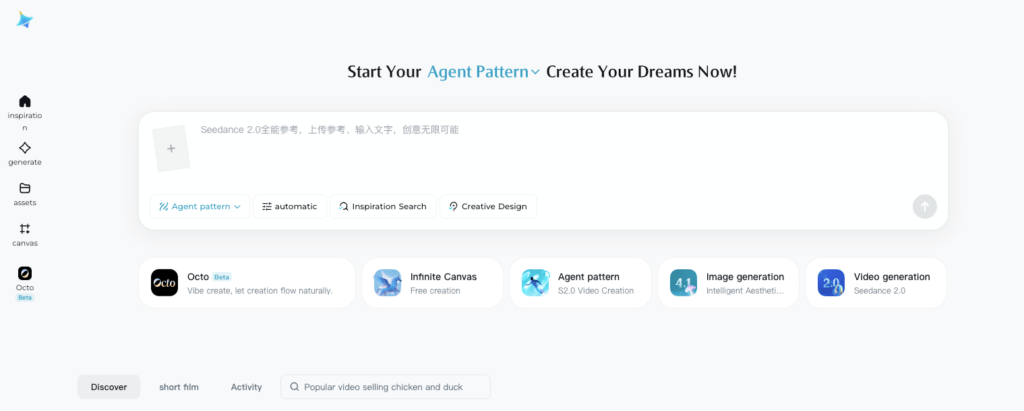
The free tier is real but restrictive. Based on testing through Little Skylark in February 2026: roughly 1,200 credits on signup, plus around 120 credits refreshed daily — which translates to about 20 initial videos and then 2 videos per day going forward.
The catches:
- Watermarks on every export — non-removable on free tier
- Lower resolution caps — usually capped at 720p
- Queue times of 15–30 minutes during peak hours vs near-instant for paid users
- No commercial license on most free-tier platforms
For prompt testing and learning the tool, free is genuinely useful. For client deliverables, the watermark alone is a dealbreaker.
The honest upgrade trigger: the moment your output goes anywhere a client or customer will see it. If it’s landing on a website, an ad, or in someone’s inbox, you need the watermark gone and the resolution unlocked.
Subscription Plans Compared
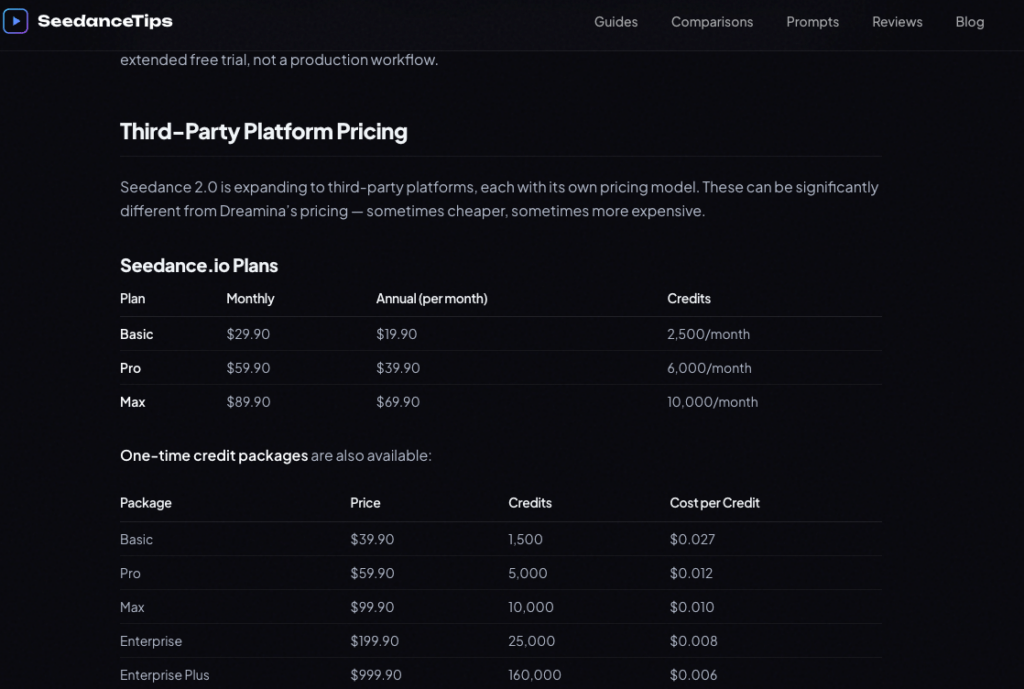
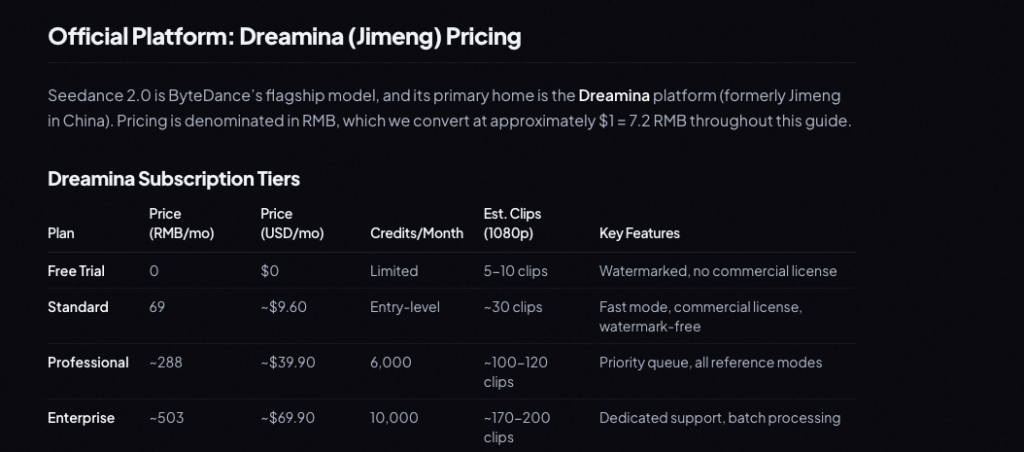
Pricing varies significantly between official and third-party platforms. Approximate ranges as of testing:
| Tier | Official Jimeng | Dreamina (International) | Third-party (e.g. seedance2.app) |
| Basic | ~69 RMB/mo (~$9.60) | ~$18/mo | ~$41/mo |
| Pro | ~169 RMB/mo (~$23) | ~$45/mo | ~$83/mo |
| Max/Team | ~399 RMB/mo (~$55) | ~$84/mo | ~$167/mo |
Official Jimeng is the cheapest route by a wide margin — but the interface is Chinese-language and payment requires a Chinese payment method or workaround. Dreamina is the official international option. Third-party platforms charge a 4× premium for English support and international payment processing.
My recommendation by user type:
- Solo creator comfortable with Chinese UI: Official Jimeng Basic — unbeatable value
- Solo creator needing English + international payments: Dreamina Basic
- Small team with steady volume: Dreamina Pro or yearly plan
- Sporadic creator: Skip subscriptions, buy one-time credit packs (they don’t expire)
For exact current numbers, check the official Jimeng pricing page and the Dreamina pricing page — bundle sizes shift more often than the per-credit rate.
API Pricing (For Developers and Automated Workflows)
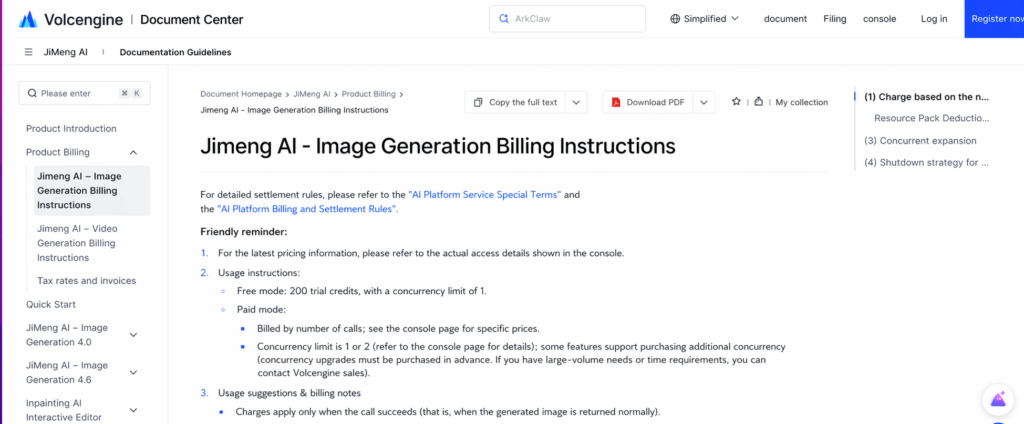
If you’re piping Seedance into an app, batch pipeline, or automation, the API is a separate billing track from the web subscriptions.
- ByteDance official Volcengine API: approximately ¥1 (~$0.14) per second of generated video for the Doubao-Seedance-2.0 model
- Third-party API resellers: rates start lower, around $0.022/sec, but quality consistency and uptime vary
A 12-second clip via official API runs roughly $1.68. The same clip via a budget reseller might be $0.26 — but I’ve hit unstable queues and inconsistent results on cheaper providers, so I budget for the official rate when reliability matters.
API has no monthly commitment, no credit expiry, and pure per-second billing. If your usage is bursty (one big project, then quiet), it often beats a subscription on cost.
The Real Cost Per Clip (After 200+ Generations)
Here’s what I actually paid per clip across different settings, on Dreamina Basic:
| Clip Type | Resolution | Audio | Approx Cost |
| 6s draft (motion test) | 720p | Off | ~$0.60 |
| 10s product loop | 720p | Off | ~$1.20 |
| 12s social cut | 1080p | On | ~$3.50 |
| 16s cinematic | 1080p | On + reference | ~$4.50 |
| 16s premium | 2K | On + reference | ~$7.00 |
The big multipliers are resolution and audio. Going from 720p to 1080p roughly doubles cost. Adding audio adds another 50–100%. Stack both and your $0.60 draft becomes a $4 final cut.
For e-commerce product loops where I add my own music in post, I leave audio off entirely. That single toggle saves about half my credit cost per clip.
How to Cut Your Monthly Cost (Real Tactics)
Three habits saved me roughly 40% on monthly spend:
- Draft-first workflow. Always validate motion at 6s/720p/no-audio first. If the draft looks wrong, re-prompt instead of bumping quality. Once the draft is right, lock the prompt and run a single high-quality pass. Magic Hour’s real-world Seedance pricing analysis confirms this approach — drafts at low settings catch about 80% of the rejections you’d otherwise pay full price for.
- One variable per retry. If lighting feels off, change lighting only — not lighting plus camera angle plus duration. Mixing variables means you can’t tell what fixed it, so you keep iterating. This discipline alone cut my retry count in half.
- Clean reference assets before uploading. This is where most wasted credits actually come from. Blurry product photos, messy backgrounds, inconsistent lighting — the model has to guess, and guessing leads to failed generations. With Seedance’s reported ~90% success rate, that’s roughly 1 in 10 generations costing you full credits for unusable output.
For my own prep, I run product shots through Cutout.Pro’s background remover before uploading — disclosure, I write for them, but it’s the same workflow I used before that. Clean backgrounds, consistent lighting, sharp focus on the subject. My first-pass success rate jumped noticeably once I stopped feeding the model messy inputs. Fewer retries means lower monthly spend, full stop.
FAQ
How much does Seedance 2.0 actually cost per month?
For most creators, $10–25/month covers 30–50 finished clips on a Basic subscription. Power users on Pro tiers spend $45–84/month. API users typically spend less if their usage is irregular but more if they generate at scale. The biggest variable is retry discipline — undisciplined users routinely double their effective cost.
Is there a free version of Seedance 2.0?
Yes, through platforms like Little Skylark and Doubao. Expect roughly 20 free videos on signup plus a small daily refresh, all watermarked and resolution-capped. Good for learning the tool, not for client work.
Do unused credits roll over to the next month?
Not on monthly subscription plans — what you don’t use, you lose at the billing cycle end. Yearly plans give you all credits upfront with 12-month validity. One-time credit packs never expire. If your usage is uneven, yearly or one-time packs prevent waste.
Is Seedance 2.0 cheaper than Sora or Runway?
On a per-clip basis, Seedance is generally cheaper than Sora ($20/month for ChatGPT Plus + limited generations) and competitive with Runway Gen-3 ($15/month entry tier with limited credits). The deciding factor isn’t usually price — it’s which model produces the look you need. Test the same prompt across all three before committing.
Can I use Seedance 2.0 for commercial work on the free tier?
No. Free tiers across most platforms grant personal-use rights only. Commercial licensing requires a paid subscription. Always check the specific platform’s terms — they vary between Jimeng, Dreamina, and third-party resellers.
What’s the cheapest legitimate way to access Seedance 2.0 in English?
Dreamina Basic at around $18/month is the cheapest official English-language route. If you can navigate a Chinese interface, official Jimeng at ~$9.60/month is roughly half the cost for similar credit allocation.
A Soft Landing
Pricing doesn’t have to feel like a mystery. Once you understand the credit rhythm, pick the right tier, and build a draft-first habit, monthly costs become predictable instead of stressful. The $18/month I’m spending now is less than what I used to lose to bad retries in a single weekend.
If video generation is starting to feel less like a budget gamble and more like a reliable creative tool — you’re doing it right.
Previous posts:
How to Remove Unwanted Objects from Photos (Free, AI, No Photoshop)
Seedance 2.0 Workflow: From Raw Photo to Final Video in 6 Steps
Remove Background for Clothing & Transparent Objects (Glass, Plastic)
How to Batch Remove Backgrounds from Images (100+ Photos in Minutes)
Photo Enhancer API: Batch Enhance Images for Ecommerce Catalogs